
Kontainer Helpdesk Kontainer Helpdesk

  • Knowledge base
  • User Guides
  • Support
Home / Tagging and Advanced Search / Edit Custom Field Resources

Edit Custom Field Resources

1686 views Less than a minute 0

Pro+ feature

We recommend enriching your files with tags and adding advanced search filters.

In Kontainer, we organize tags and filters under the function Custom Fields. That’s our technical term for different categories of tags and search filters.

Read a lot more on how to set up custom fields here.

Once your custom fields have been set up, you’ll want to add values/tags to any that use the select function.

Go to Resources → Custom Fields and start adding in your options. Unless otherwise instructed, you can add the same in both
‘’Name’’ and ‘’Internal Value’’.
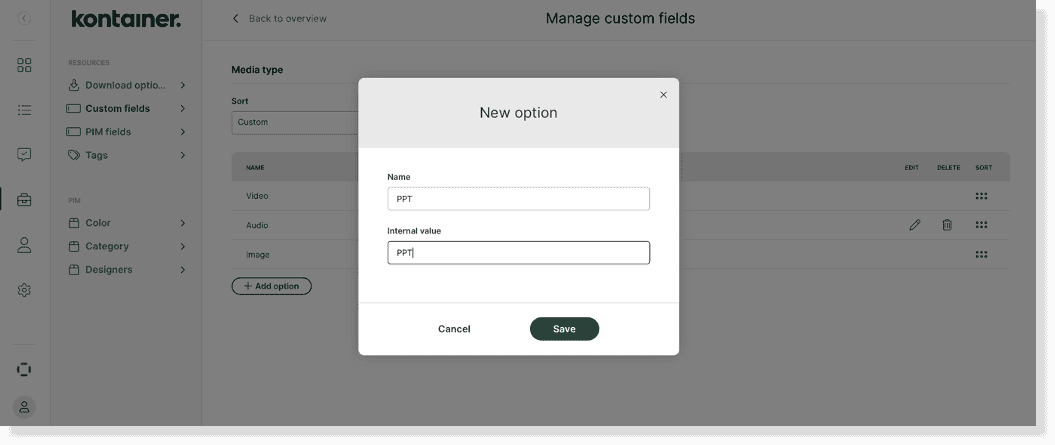
Custom Fields Guide image 5

You can also add values later when editing the data on your files.
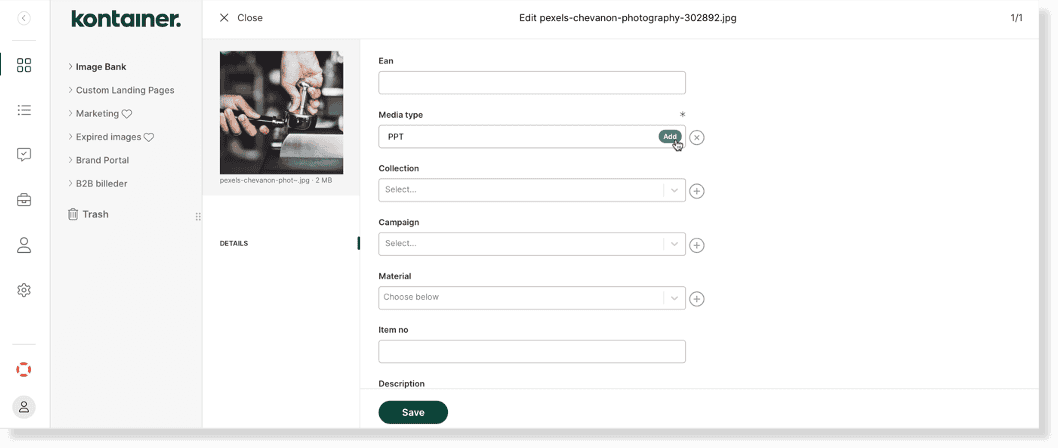
Custom Fields Guide image 6


—

That’s it, really!

Get in touch about custom fields, filters and search.


Tagging and Advanced Search

About js

View all posts by js →

Table of Contents

Related Articles

  • AI functions for DAM
  • Headings and descriptive text for DAM tagging and PIM fields
  • A Guide to Smart Folders
  • Basic Tags vs. Custom Fields

Follow us

Remote support

Book a support session here

For desktop sharing click here

Cookie & Privacy Policy

Please read our privacy policy

Click here

Flatbase by NiceThemes © 2025. — Powered by WordPress.